QUARRYFLOWOPERATIONS CONNECTED
Let’s talk
BUILT AROUND THE WORK ON SITE

Your quarry.
One connected
workflow.

From the first bucket to the final delivery. Bring your office, operators, sales yard and drivers into the same working day.

Open in your browser · Workspaces for each role · Start with one site

QF /THE WHOLE DAY, CONNECTED
⌂
COMPANY VIEWHead Office
● Connected
▱
DAILY OPERATIONSSite Office
↗
01 /ProductionRecord the work
02 /Sales YardCoordinate loads
03 /DriversKeep deliveries moving
A record of every working dayReview, approve and find it again in the calendar.
ONE SITE OR A GROWING OPERATION
FOR THE PEOPLE WHO KEEP MATERIAL MOVING
Quarries · Aggregate yards · Material suppliers · Site & office teams

LESS CHASING. MORE VISIBILITY.

A working day that
stays together.

Orders in one place. Production somewhere else. Yesterday’s records in a pile. QuarryFlow brings those handovers into a shared workflow.

01

Set up your operation

Give each team its own workspace. Start with your site, products, machines, trucks and people.

02

Record as work happens

Operators record production. Yard teams coordinate loading. Drivers update their deliveries.

03

Close the day with clarity

Site Office reviews the day. Accepted records stay under their production date, ready to find in the shared calendar.

SEE THE WORKFLOW IN ACTION

Take a look around
QuarryFlow.

Watch the app walkthrough, then talk to Adam about how it could fit your site.12 min 38 sec · QuarryFlow demo
Preview of the QuarryFlow Site Office demo

The player loads only when you press Play. Facebook may use cookies and process playback information.

Watch on Facebook ↗

A CLEARER VIEW OF THE SITE

The work is on the ground.
The overview is right here.

Explore the public demo
QuarryFlow / Site OfficeDEMO
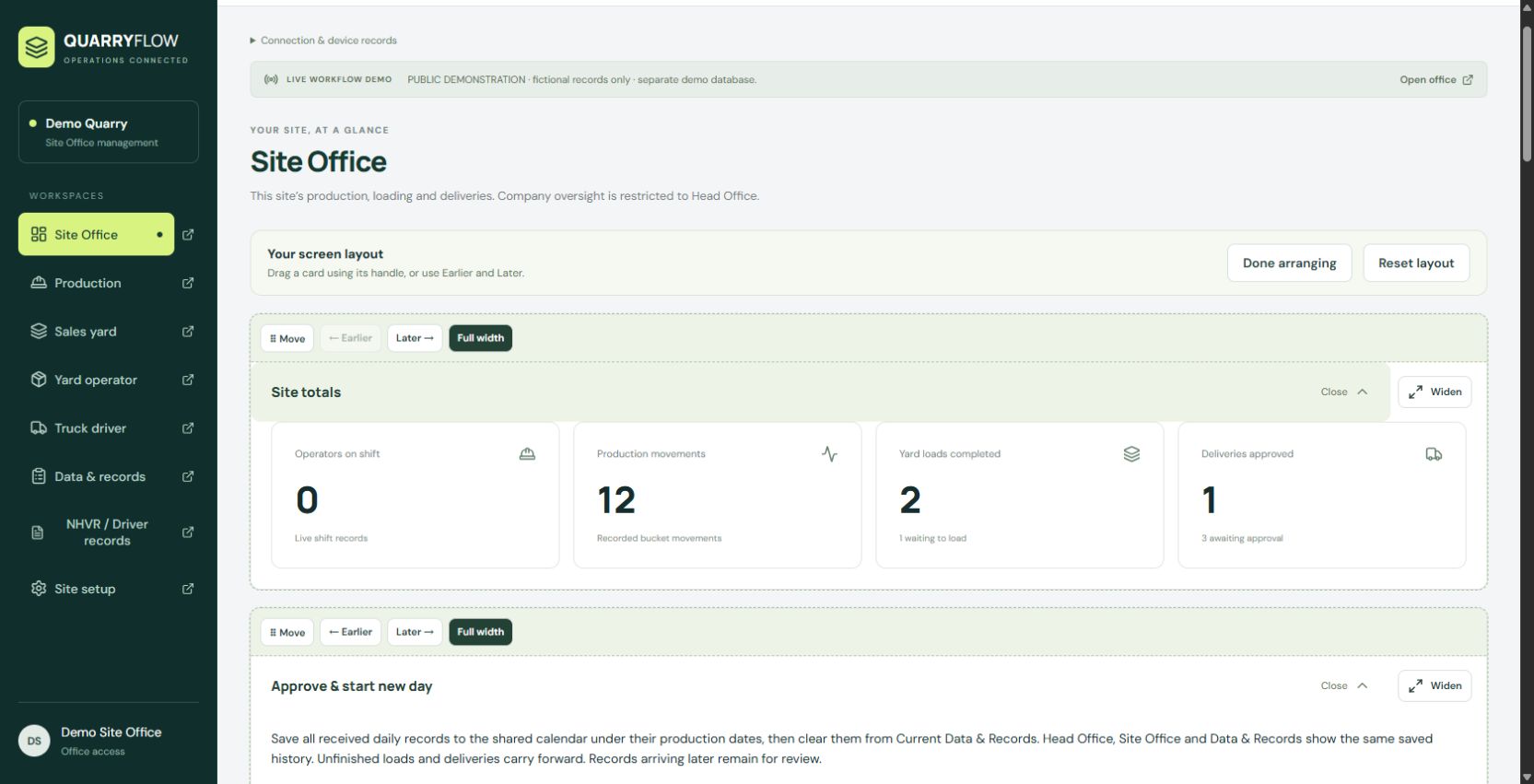
QuarryFlow Site Office showing daily totals, workspaces and the approve and start new day card, with fictional demo records.
Real app screenshot · fictional demonstration recordsArrange cards to suit the way your team works.

THE RIGHT SCREEN FOR THE JOB

Different roles.
One operation.

A driver needs a delivery screen. An operator needs production tools. Head Office needs the wider picture. Each has a workspace for its part of the day.

OVERSIGHT WITHOUT LOSING THE DETAIL

See the site.
Keep the company in view.

Site Office manages the working day. Head Office brings company sites together, with filters for the operation you need to review.

  • Daily activity, production and delivery overview
  • Product stock balances and recorded availability
  • Saved Data & Records by calendar date
  • Rearrange cards for your own workspace
Talk through your setup

BUILT FOR A PRACTICAL START

Start with your site.
Build from there.

We’ll walk through how your team works, choose a useful starting point and agree what a trial should cover.

Let’s discuss your site
↗

A link, rather than an app-store wait

Open the web app in a browser on a phone, tablet or computer.

↗

Guidance inside the app

Built-in walkthroughs help staff find the next step. An optional AI helper can answer documented app questions.

↗

Plan for patchy reception

Prepare assigned devices while connected. Supported records can be captured offline and synced when the connection returns.

BEFORE WE GET STARTED

A few practical
questions.

Have a different question?
Ask Adam

Is QuarryFlow available for a trial?

We’re inviting businesses to discuss a practical trial. We’ll agree the scope, timing, support and any costs directly before you begin. No trial length or subscription is committed by this page.

Do we need to install an app?

QuarryFlow is a web app. Your team opens its assigned workspace link in a supported browser. We’ll check your devices and connection during setup.

Can we start with one site?

Yes. Start with one site and the workflows you need. Head Office can oversee additional company sites as your setup grows.

Can I see it before sharing company data?

Yes. The public demo uses fictional records. Explore the workflows there, then talk to us about a separate company trial. Please keep real customer and operational information out of the public demo.

What does it cost?

Pricing and trial arrangements are being finalised. Tell us about your sites and team, and we’ll discuss the options before you make a commitment.

Is it an approved driver compliance system?

QuarryFlow supports driver records, but it is not an NHVR-approved Electronic Work Diary. Your existing legal work/rest and compliance obligations continue to apply.

LET’S SEE HOW IT FITS

Tell us about
your operation.

One site or several. An office handover that needs work. A yard that needs a clearer view. Start with a conversation.

AW
Adam WhiuQuarryFlow
0412 425 475 Find QuarryFlow on Facebook

This form prepares an email to Adam at kiwiai2024@gmail.com. Nothing is sent or stored by this website. Review the prepared enquiry, then open your email app to send it. Please leave out sensitive records.

Privacy & enquiries

This marketing page doesn’t load analytics or advertising trackers automatically and has no server-side enquiry database. If you choose to play the demo, the embedded player connects to Facebook, which may process your IP address, browser information, cookies and playback activity under its own privacy policy. You can use the direct Facebook link instead. Your form entries stay in this page until you choose to open your email app or copy them. They are not saved in browser storage by this site.

When you send an enquiry, it goes to Adam Whiu at kiwiai2024@gmail.com through your email provider. Adam uses it to discuss QuarryFlow and respond to your request. Contact that address if you want your enquiry corrected or deleted.

Cloudflare, the hosting provider, may process technical request information to deliver and protect this website. Facebook and email services have their own privacy policies. The operational QuarryFlow app is separate from this marketing page.

Cloudflare privacy policy ↗